| Gemma Bonham-Carter |
AI + online marketing / thursdays |
| Issue 05 |
September 24, 2026 |
|
Happy Thursday from Orlando! ✨
I’m writing this week’s issue from Florida, where I’m in the middle of some really exciting new partnership work that I can’t wait to tell you about.
Let’s just say I’ve been spending time with a female founder who built a unicorn business (if you’re not fluent in startup speak, a unicorn is a company valued at more than $1 billion, and she built one from the ground up and exited it). So when a founder at that level wants to talk AI strategy, you’d better believe I show up. I’ll fill you in soon!
In the meantime, let’s get into this week’s issue of Noted.
|
| |
| In this email |
| [ 01 ] |
Your custom GPTs stop working on December 11. Here’s what to do before a confused customer finds the dead link first |
| [ 02 ] |
Meta now wants $49.99 a month to let you link to your own website |
| [ 03 ] |
Your worst doodle can now become a finished image in ChatGPT |
| [ 04 ] |
Claude is merging Cowork into regular chat, so you’ll never have to pick a mode again |
|
| 🔥 The big one |
01 |
Your Custom GPTs Stop Working on December 11.
|
|
|
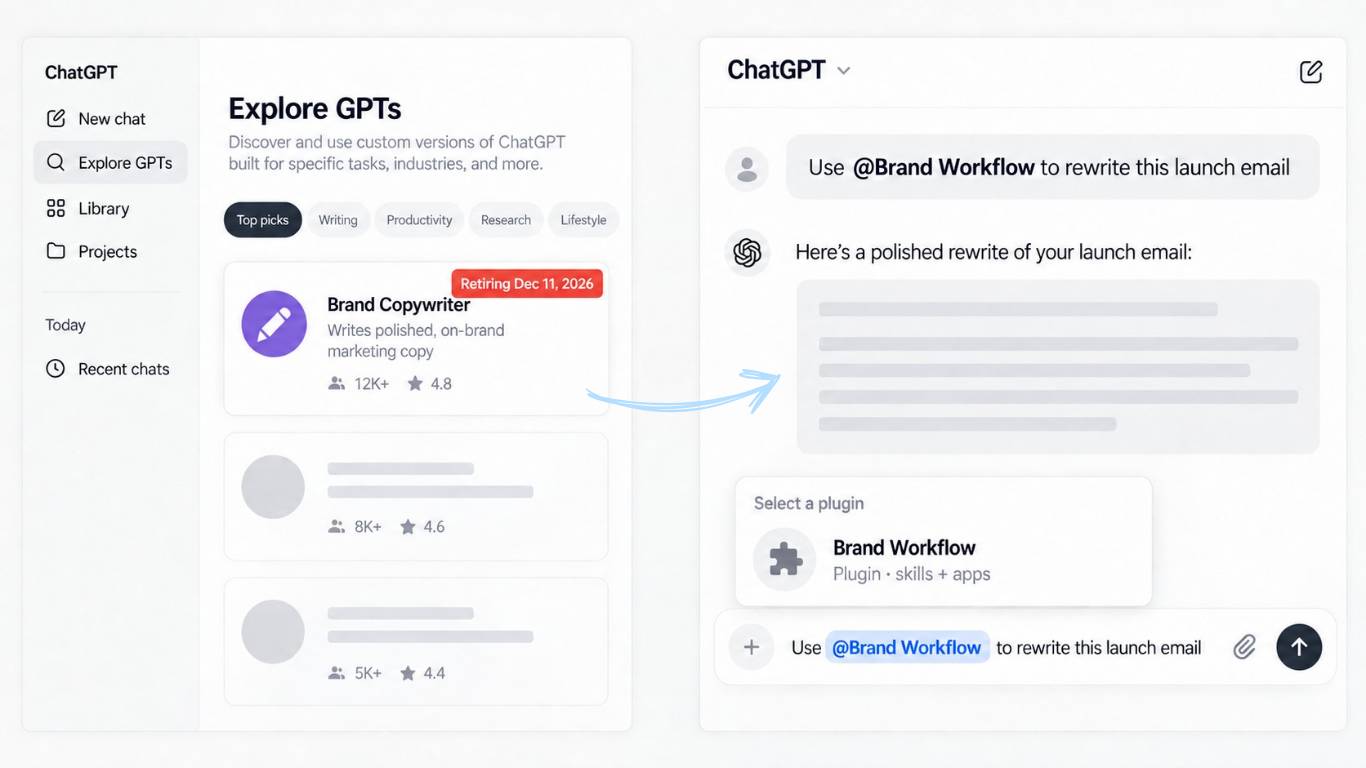
OpenAI is retiring custom GPTs. On December 11 they stop running and disappear from the GPT directory, so if you built one (or handed one to your students, clients, or email list), this one’s on your desk.
So why kill a feature people actually built businesses on? OpenAI’s FAQ doesn’t say much beyond “migrate to plugins,” but the bigger picture is pretty clear. They’ve spent this year pulling everything into one plugin system that works across regular ChatGPT, ChatGPT Work, and Codex, and custom GPTs don’t fit that model. A GPT was a room you had to walk into: a separate chat with one set of instructions, and you couldn’t easily use two of them at once.
Plugins flip that. Your instructions become a “skill” you pull into any normal conversation with an @ mention, so it works alongside your other tools instead of sitting locked in its own little box. I’m completely on board with the direction because it’s the better design. (If that sounds familiar, it’s the same idea behind Claude skills.)
If your GPTs are just for you, back up the instructions into a doc you own, run the migration when it shows up in your account, and then actually test it, because a migrated plugin won’t always respond the same way. Before you migrate, publish any final edits, because only the published version transfers (publishing doesn’t mean making it public). There are two catches. Custom actions don’t transfer, so anything connected that way has to be rebuilt, and once you migrate, the original goes read-only and can’t be deleted.
If you’ve shared a GPT with your audience, this is the part that bites. Migration doesn’t bring your users with you, and OpenAI says it outright: it “doesn’t carry over your GPT’s sharing settings or give its existing users access to the replacement.” You can make a plugin public again, but that means going through a separate submission process, and anyone using it will need an account where plugins are available.
That means the link in your course module, welcome sequence, sales page, or link in bio goes nowhere on December 11, and the first person to notice will be a confused customer. 👀
So make a list of every place that GPT is linked, and start planning. If you want to keep it public inside ChatGPT, that plugin submission process is your first stop. If you’d rather not depend on OpenAI’s approval, stop thinking of it as a link and start thinking of it as a file. Share the instructions and knowledge files as a download, and people can set it up in whatever AI tool they already use. If you’d rather keep the click-and-chat experience, there are many paid platforms that host a chatbot like this on your own site or behind a login.
December 11 is the retirement date for every plan. OpenAI has only published the earlier milestones for Enterprise workspaces, and even those are targets:
|
| • |
Sept 22: migration tools targeted to start rolling out |
| • |
Oct 26: new custom GPT creation ends, so publish any drafts you want to migrate before then |
| • |
Dec 11: custom GPTs stop running |
|
|
OpenAI has already changed these once, so check the notice in your own account before you plan around them.
The real takeaway is that the GPT was never the asset. Your instructions were: your frameworks, your examples, and the way you taught it to think, reason, and write. The GPT was just the container, and containers get discontinued.
Back that thinking up somewhere you own, and it stops mattering what OpenAI does next quarter. Platforms will keep changing, but good business IP goes wherever you go.
|
|
|
| |
| 👀 Hot take |
02 |
Meta Just Put a Price Tag on Sending People to Your Own Website
|
|
|
Facebook and Instagram are both owned by Meta, which means one company gets to decide how much traffic you’re allowed to send off its platforms, and it can change those rules whenever it feels like it.
This month, it started doing exactly that.
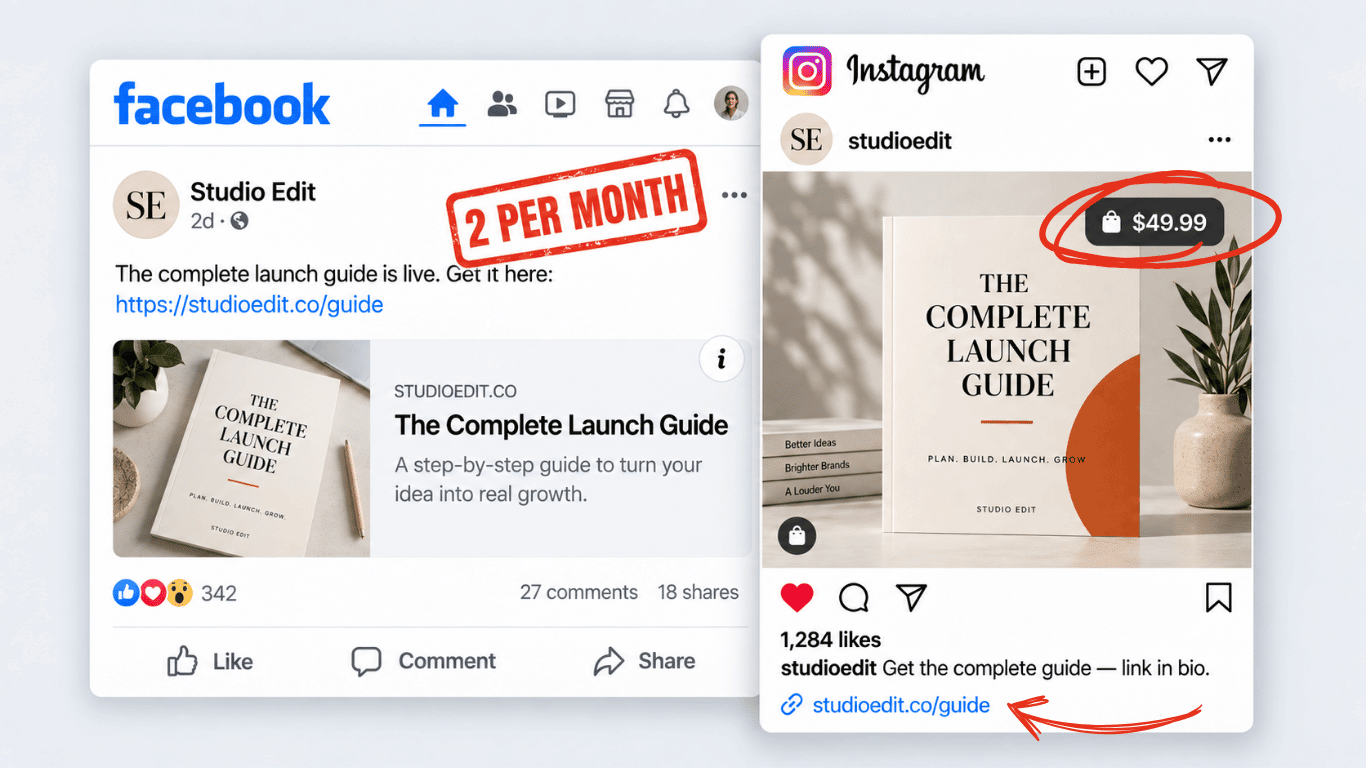
Meta launched “Meta One for Business”, a new subscription with 4 tiers ranging from $14.99 to $499 a month. Most of what’s inside sounds reasonable enough, like competitor tracking, posting-time recommendations, and bulk uploading. But there are a couple of other rumblings that came along with it, and those are the part you should pay attention to.
On Facebook >> Meta is expanding a test that caps some business Pages at 2 link posts per month unless they subscribe. It started quietly as a small test back in December, and now it’s rolling out to more Pages right on schedule with the new subscription. News publisher Pages are exempt because Meta still wants the news flowing into the feed, but your business Page doesn’t get that pass. So sharing your latest blog post or sales page, which used to be free and unlimited, is now something you get to do twice a month.
On Instagram >> The feature we’ve all been asking for since roughly 2014 is finally here: clickable links in posts and reels. The catch is that it only comes with the paid tiers. The $49.99/month Advanced tier gets you links in 4 posts and 4 reels a month, $149 gets you 8 of each, and $499 gets you 12. So the thing we wanted exists now, but at the cheapest level it costs $600 a year for 8 linked posts a month.
Should you pay for it? Maybe. If you’re actively promoting an offer on Instagram and a single conversion covers the year, test Advanced for 30 days and actually track what those links do. Cancel if the ROI isn’t there.
Your email list, meanwhile, has never once asked you to upgrade to the Advanced tier so you can include a link. No email platform is out here testing a “2 links a month” plan on you, and if one ever tried, you could pack up your list and take it somewhere else by lunch.
Which is why I’ll keep saying this until I’m 87 years old and sending newsletters from the French cafe I plan on owning one day: you can build the audience on social, but then always move the relationship somewhere you own (your email list).
|
|
|
| |
| 🎨 Try this |
03 |
Your Worst Doodle Can Now Become a Finished Image in ChatGPT (and more features of their latest Image update)
|
|
|
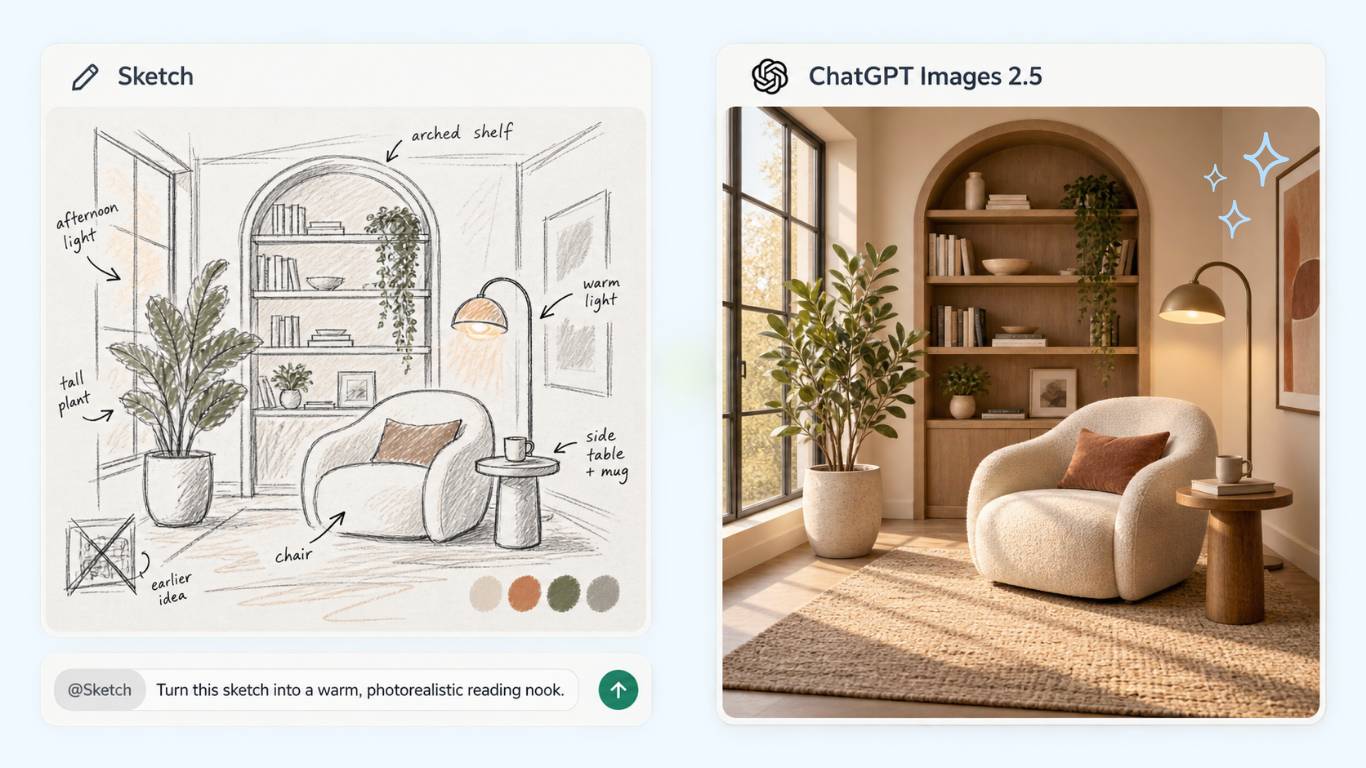
On September 8, OpenAI released ChatGPT Images 2.5, and it’s worth a look.
ChatGPT has been our go-to for image generation in the business. We don’t make images every day, but when we need one, that’s where we go, because the model has consistently given us the best results.
The update I care most about? Drift. If you’ve ever asked ChatGPT to change one small thing in an image, you know the pattern: the new version fixes that detail but drops parts of the original you loved, and now you’re trying to stitch the best bits of 2 images together. OpenAI says Images 2.5 is much better at holding onto your visual direction, composition, and individual details as you keep adding instructions. That matters if you’re creating a series of on-brand graphics, slides that need to follow a set structure, or anything where consistency counts. It also handles more complex layouts now, including transparent backgrounds, which is a nice win for anyone making their own graphics.
The other fun update is the new sketch feature. Click over to OpenAI’s announcement just to watch the demos! You rough out a drawing and ChatGPT turns it into a finished image. Their garden example, where a quick sketch of a garden plan comes to life, is the one that got me. We’re doing a backyard renovation right now, so it came in super handy! My daughter also loves sketching fashion designs, and seeing those come to life in ChatGPT is pretty cool.
It’s useful on the business side too. When you need a very specific graphic, say a product on the left with open space for text on the right, it’s often easier to sketch it than to describe it in a paragraph of prompt. Draw the rough version, let ChatGPT polish it, and you’ll spend a lot less time explaining yourself.
|
|
|
| |
| 📌 Worth knowing |
04 |
Claude Is Merging Cowork Into Regular Chat, So You’ll Never Have to Pick a Mode Again
|
|
|
A question I get all the time is some version of “When should I use Cowork, and when should I just use regular Claude?” It’s a great question, and pretty soon you won’t have to answer it at all.
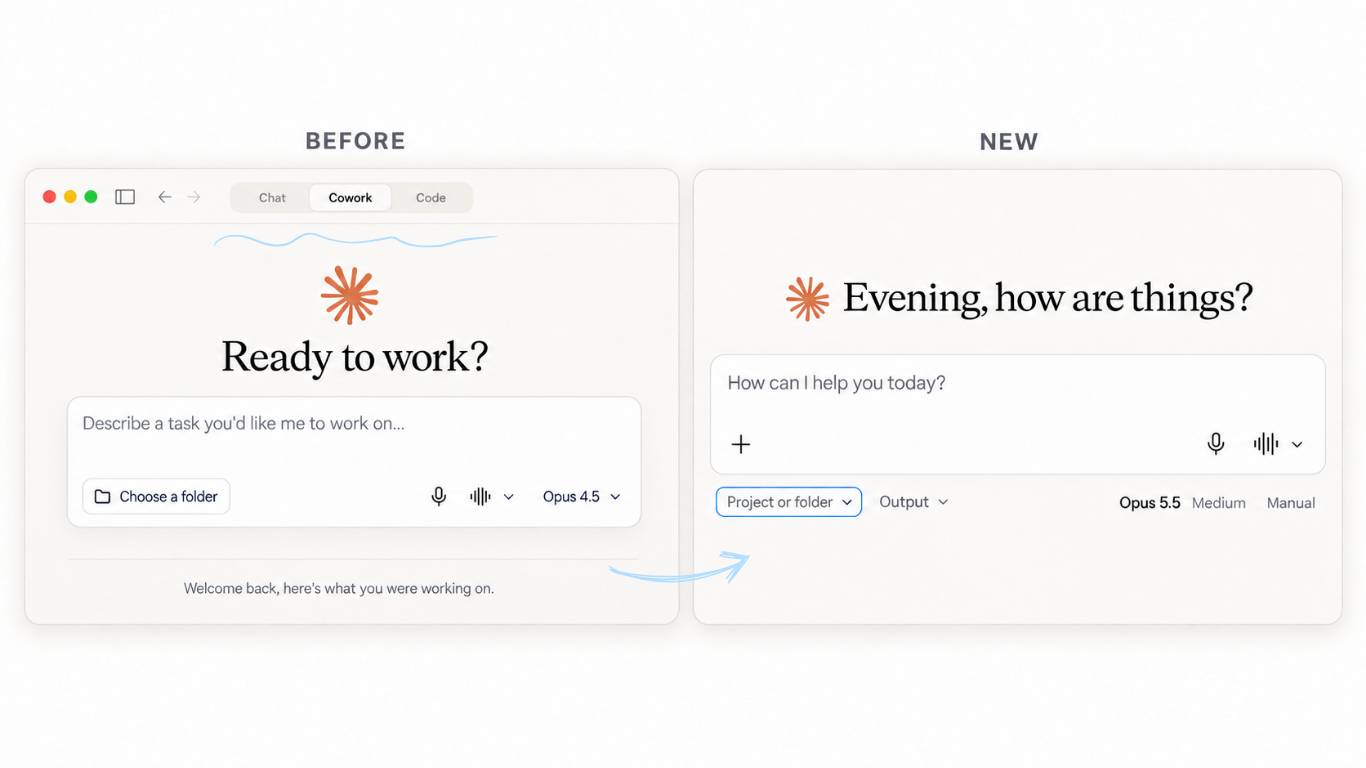
On September 16, Anthropic announced it’s folding Cowork into regular Claude, which means one window and no mode to pick before you start. Claude reads what you asked for and works out on its own whether you need a 2-line answer or a 2-hour project.
You describe what you want to end up with, and Claude figures out which tool makes it.
Don’t go hunting for it this afternoon, because it isn’t live for most accounts yet. It’s rolling out to Pro and Max first over the next few weeks, with Team and Free after that, and Enterprise admins get at least 30 days notice before anything changes for their teams.
You’ll know you have it when the separate Cowork tab disappears and you just start typing. Until then, my advice has always been to use chat for one-track tasks and Cowork for multi-step tasks (Cowork spins off “sub agents” to do things at the same time, versus chat which is more linear).
|
|
|
| |
|
That’s a wrap. If you’ve built a custom GPT, do one thing this week: list every place it’s linked (course modules, welcome sequence, sales page, link in bio) and back up the instructions somewhere you own. December 11 will sneak up on you. Trust me on this one.
Hit reply and tell me what you’re doing with yours. I read every one.

|
See you next Thursday
Gemma.
|
|
| P.S. |
| Love this newsletter? There’s a whole lot more AI training where this came from. AI All Stars is where I teach the full system, and you get my complete set of custom-built skills (there are over 38 of them). Start with the free AI workshop and get a behind the scenes look. |
|
|
|
|