| Gemma Bonham-Carter |
AI + online marketing / thursdays |
| Issue 04 |
September 17, 2026 |
|
Hey there!
Phew, it’s been a busy week in the AI space.
Did you see the news stories of the founders of OpenAI and Anthropic saying governments need to slow down or pause AI development? And then Trump’s take on it? It’s all evolving so rapidly, every day. I don’t plan on getting into the politics of AI right now (I feel just as scared and anxious about AI as I do excited about its positive aspects). As always, we are focused on using AI for good and giving small business owners leverage.
And with that, let’s dive in.
|
| |
| In this email |
| [ 01 ] |
Your next client isn’t Googling you anymore. She’s asking AI who to hire (here’s a free 10-minute check to see if you’re in the answer) |
| [ 02 ] |
Claude has its own browser now. Send it through your funnel before your next lead does |
| [ 03 ] |
Stop telling AI to double check your work. It already does |
| [ 04 ] |
Claude runs long, ChatGPT runs short. The summer update nobody is talking about |
|
| 🧠 The big one |
01 |
Your Next Client Isn’t Googling You. She’s Asking AI Who to Hire.
|
|
|
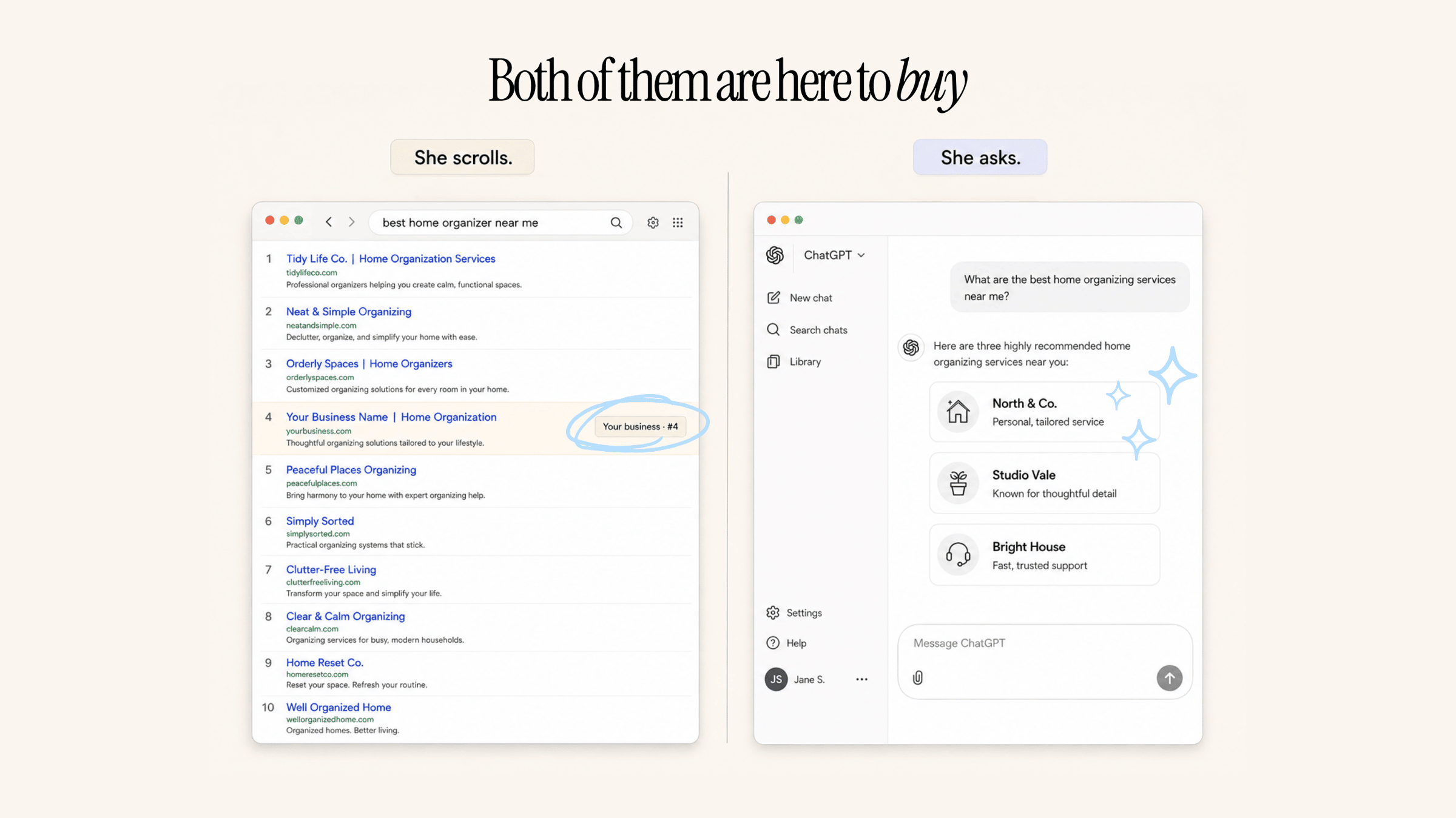
Somewhere right now, your ideal client is getting ready to hire someone like you. She’s 6 months out from her wedding, or she finally decided this is the year the garage gets organized, or she’s been told she needs a nutrition plan and doesn’t want to figure it out alone. A few years ago she’d have typed a few words into Google and started scrolling. Now there’s a real chance she opens AI and asks it like she’d ask a friend: “Who should I hire for ____?”
She gets 3 names back. Maybe she checks out two of them and books a call with one. If your name wasn’t in that answer you were invisible, because there’s no “page 2” of an AI answer.
This week’s blog post is the playbook for getting into that answer. AI only recommends businesses it’s confident about, and confidence comes from consistency. Think of it as a reference check. If your website says “holistic wellness coaching,” your Instagram bio says “nutrition for busy moms,” and a 4-year-old directory listing says “personal training,” AI doesn’t average those into something flattering. It gets unsure, and unsure businesses don’t make the answer.
Is this a ranking you can climb to #1? No. When SparkToro had 600 volunteers run about 3,000 identical prompts, the odds of the same list of brands coming back twice were under 1 in 100. The names shuffle every single time, except for a small handful of businesses that show up in almost every answer. So we are going for consistency here, which will help us get into as many answers as possible.
Start by finding out what AI believes about you right now. It’s free and it takes 10 minutes. Here’s how:
|
| Step 1 |
Open 2 or 3 AI platforms, ideally the ones your clients are most likely to use. |
| Step 2 |
Paste this into each one: |
|
| Copy this prompt |
I’m researching a business called [your business name] at [your website]. Answer 3 things:
1. What does this business actually do?
2. Who is it for?
3. What makes it different from the alternatives?
If you’re not confident about any of these, say so instead of guessing. |
|
| Step 3 |
Run the exact same prompt on your closest competitor. That comparison is pretty interesting!
|
| Step 4 |
Grade what came back on 3 things: Is it accurate? Is it specific? And is it the same across every AI you asked? Vague, wrong, or conflicting answers are your first fix, and it’s usually an afternoon of work, not a rebrand.
|
|
|
The post walks through the 3 moves that come after the audit: your 3 lines said the same way everywhere, 1 lane you cover more deeply than anyone else with material only you have, and mentions on pages you don’t own. Plus the 15-minute-a-month spreadsheet I’d use to track it.
Almost nobody in your niche is running this playbook yet. Go first.
|
|
|
| |
| 🖥️ Try this |
02 |
Your Funnel Has a Broken Link. Claude Will Find It While You Make Coffee.
|
|
|
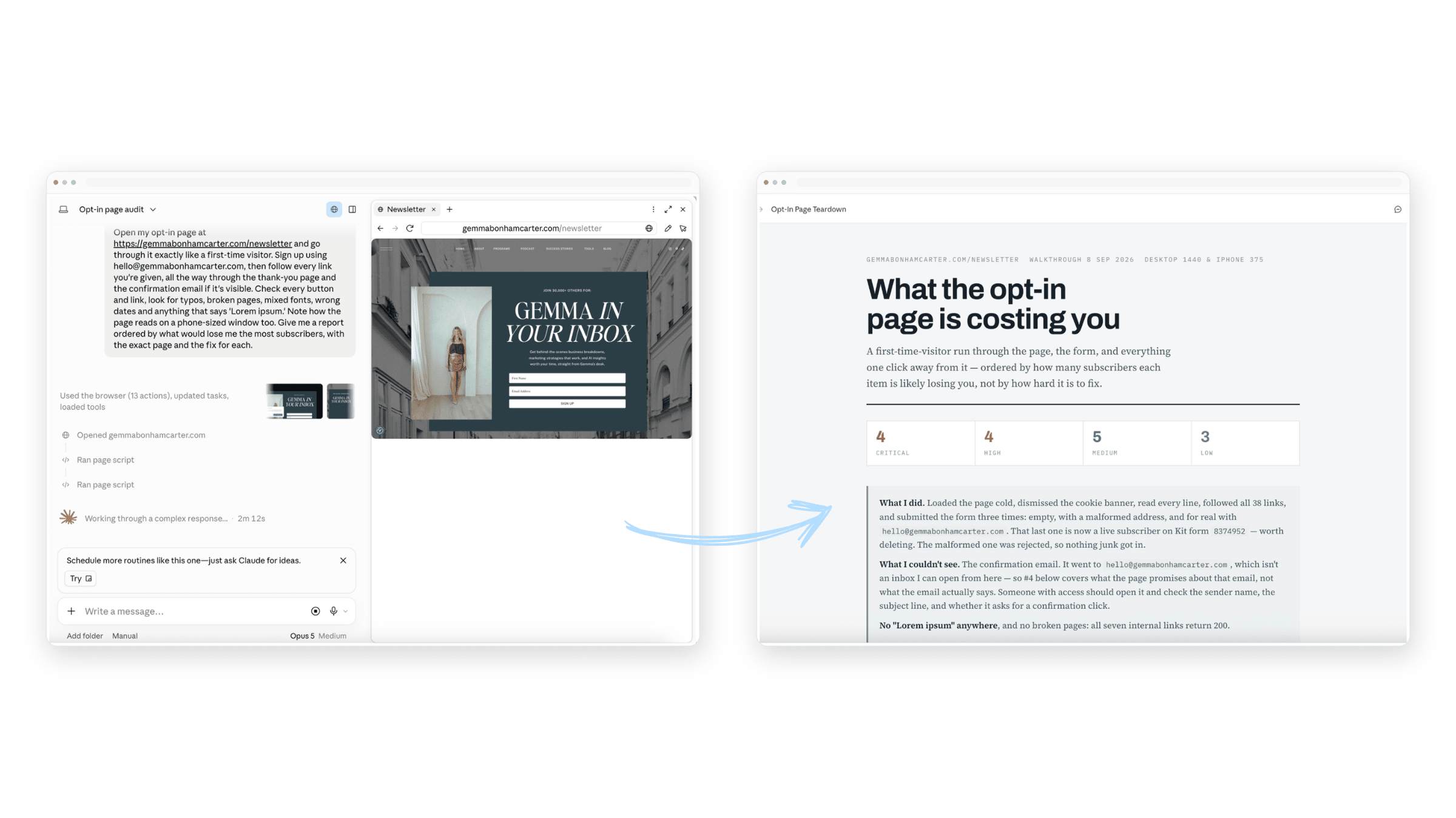
Claude got its own browser recently. Not the Chrome extension you may have seen, but a separate browser that lives inside the Claude desktop app, and it does the clicking for you.
You give it a job, it opens pages, reads them, fills in forms, and comes back with the answer. Your tabs, bookmarks and passwords stay out of it (it can’t see any of that unless you hand it a specific login on purpose).
So here’s how you can put it to the test:
When did you last go through your own funnel like a stranger? Opt-in page, thank-you page, confirmation email, the first link in the welcome sequence. Most of us haven’t done it since the day we built it. And that’s exactly where the typo, the dead button, and the “oops, this page doesn’t exist” are hiding.
Who’s doing that on a Tuesday? Not me! Which is why it’s a perfect first job for a browser that doesn’t get bored.
So go run it. Here’s how I did it:
|
| Step 1 |
Open the Claude desktop app and click into Cowork. You need Pro, Max or Team for this one. |
| Step 2 |
Paste this in: |
|
| Copy this prompt |
| Open my opt-in page at [PASTE URL] and go through it exactly like a first-time visitor. Sign up using [test email], then follow every link you’re given, all the way through the thank-you page and the confirmation email if it’s visible. Check every button and link, look for typos, broken pages, mixed fonts, wrong dates and anything that says “Lorem ipsum.” Note how the page reads on a phone-sized window too. Give me a report ordered by what would lose me the most subscribers, with the exact page and the fix for each. |
|
| Step 3 |
Let it run. I did it for my webinar funnel and it took about 30 minutes to do the whole thing. Once it’s finished, it gives you a report of everything that needs fixing. I was a little shook at the 8-point report it sent my way (waaaay more little errors than I was aware of!). |
| Step 4 |
Fix your funnel! Ha. I asked Claude “which of these can you fix for me?” and it was able to fix 6 out of the 8 errors itself, since I have it connected to my email service platform and a few other tools I use. The rest we handled as a team. |
|
|
Using Claude to do quality control like this is a huge time saver. Take advantage!
|
|
|
| |
| 🧰 Prompt of the week |
03 |
Stop Telling AI to Double Check Your Work. It Already Does.
|
|
|
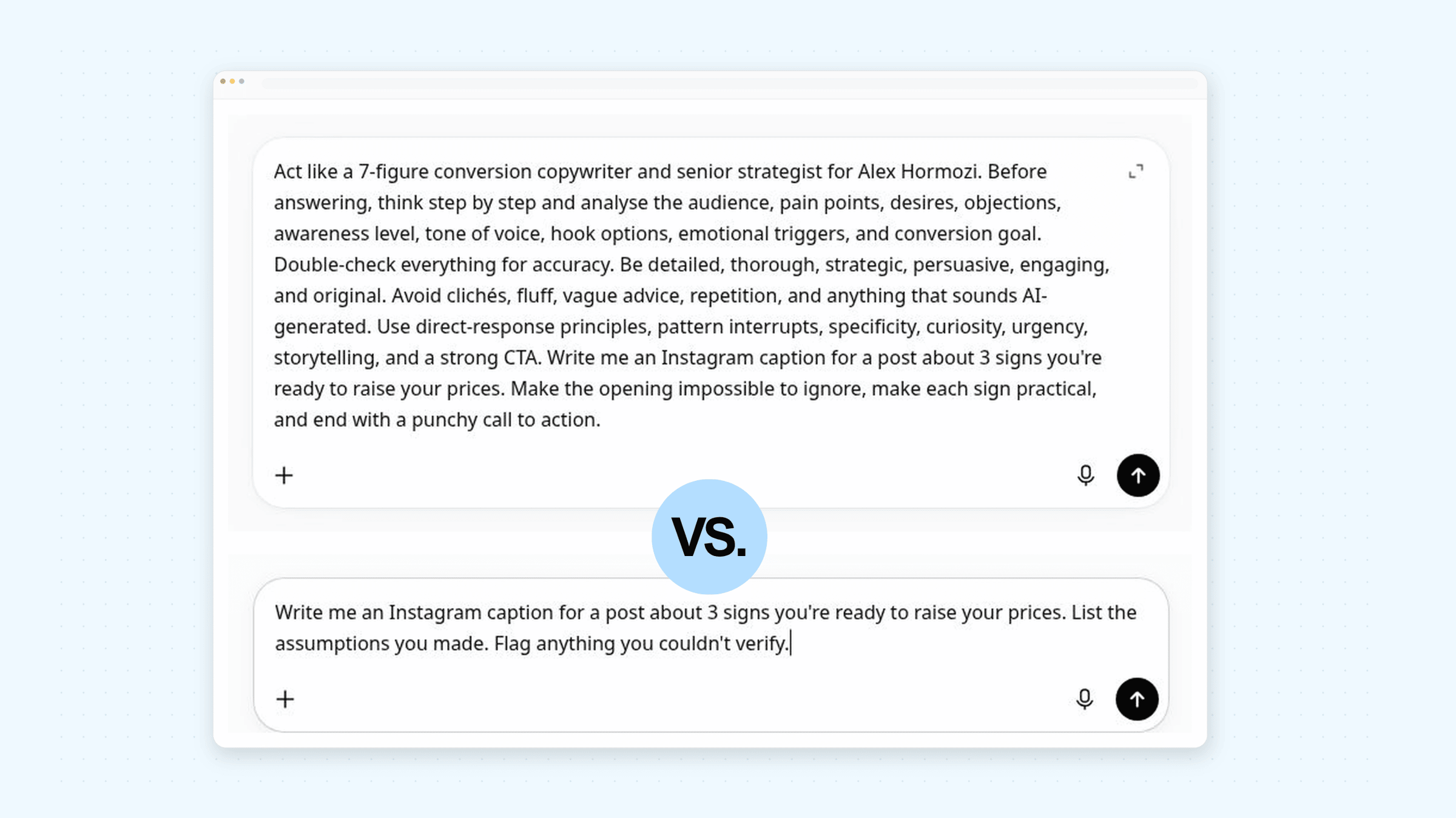
I used to recommend prompting AI to “double check your work” before handing it back.
Well, take a deep breath.
Because Anthropic and OpenAI both quietly rewrote their prompting playbooks, and the short version is that we don’t need to worry about it anymore.
The newest models verify their work as they go.
“Double check this” doesn’t make the answer better. It makes it slower and pricier, and Anthropic’s own guide now says to delete those lines.
|
|
|
| |
| 🧰 Worth knowing |
04 |
Claude Runs Long. ChatGPT Runs Short. New Updates Made This Summer.
|
|
|
If you use both Claude and ChatGPT, you’ve probably noticed that one of them is a lot chattier than the other.
That’s not your imagination. Both companies published updated prompting guides this summer worth knowing about: the newest Claude runs long by default, and the newest ChatGPT runs short.
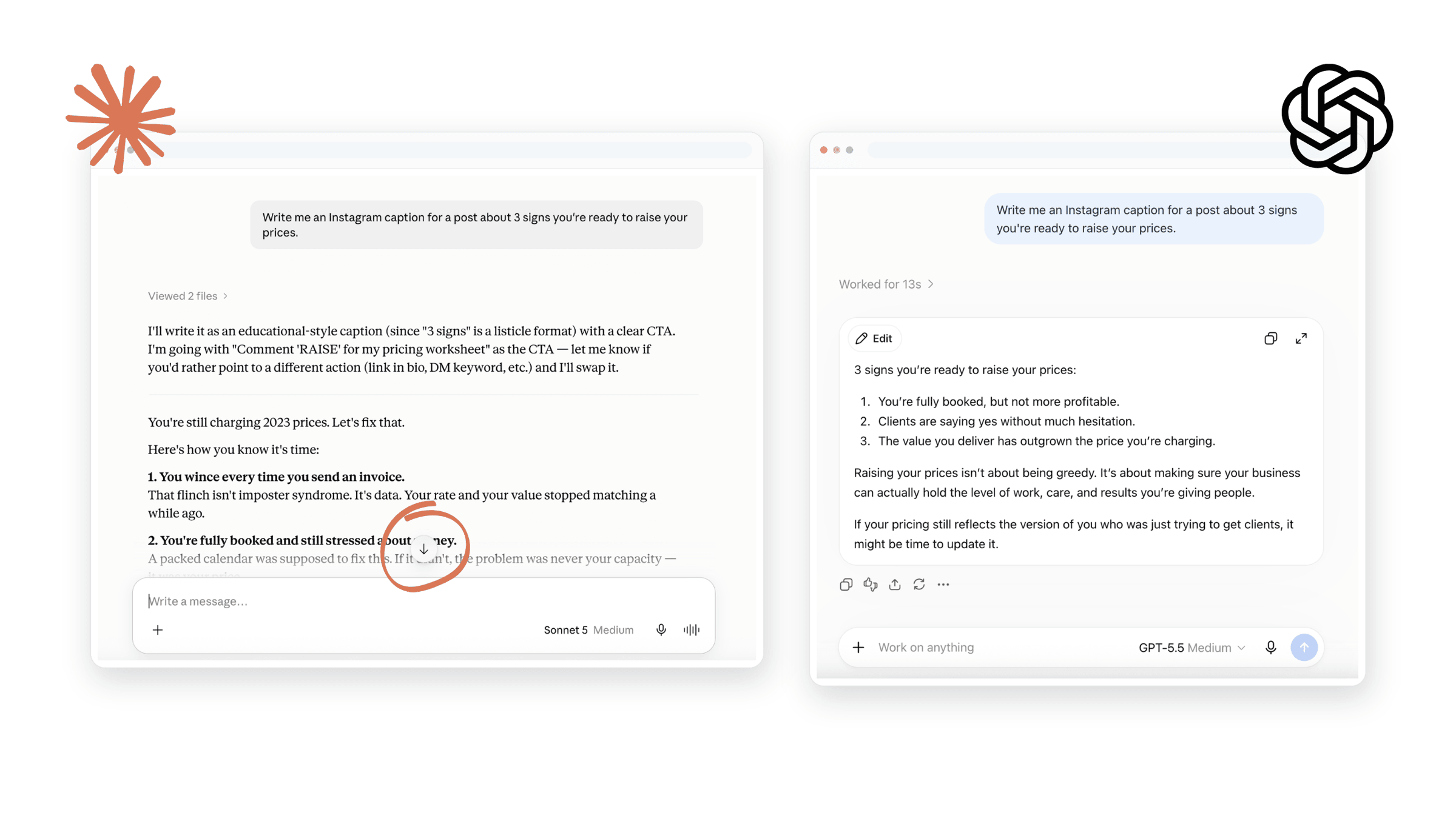
You see it the second you give both tools the same prompt. Ask for an Instagram caption and Claude hands you 4 paragraphs, a hook, and 3 alternate versions you didn’t ask for. ChatGPT hands you 3 tight lines and stops.
Anthropic says the newest Claude’s responses run longer than previous versions, and that the only reliable way to shorten them is to name the length in your prompt.
OpenAI says the opposite about its newest model: lower verbosity, more concise and task-focused out of the box.
Two companies, two deliberate choices, pointed in opposite directions.
For us business owners and marketers, length isn’t cosmetic. A sales page wants room to breathe, an ad wants 2 sentences, a subject line wants 2-4 words. If you never name the length, you’re accepting whatever the tool defaults to and then burning your time editing against it.
Sometimes the defaults work in your favor. Claude’s long default is useful for first drafts of sales pages, webinar scripts, and email sequences, because cutting is faster than padding. ChatGPT’s short default is better when you want 20 hook variations and you’re hunting for one good one.
But the lesson here isn’t about which tool is better. It’s that you should always ask for what you need. Writing “give me 3 options, 40 words max, no preamble” takes 8 seconds to type (or even less to say!) into your AI tool of choice, and that way you get what you want, not what the tool was going to guess is best.
|
|
|
| |
|
That’s a wrap. If you do one thing this week, run the 10-minute check in section 1 and find out what AI believes about your business right now. Then run it on your competitor. Trust me on this one.
Hit reply and tell me what came back. I read every one.

|
See you next Thursday
Gemma.
|
|
| P.S. |
| Love this newsletter? There’s a whole lot more AI training where this came from. AI All Stars is where I teach the full system, and you get my complete set of custom-built skills (there are over 38 of them). Start with the free AI workshop and get a behind the scenes look. |
|
|
|
|